Wirelio
Spark Collection
Spark Collection
Couldn't load pickup availability
Self-paced learning overview
- 📥 Digital file available after purchase
- 📚 Long-term availability
- 🔒 Secure checkout
- 🗓️ Content updated in 2026
1. Problem Statement
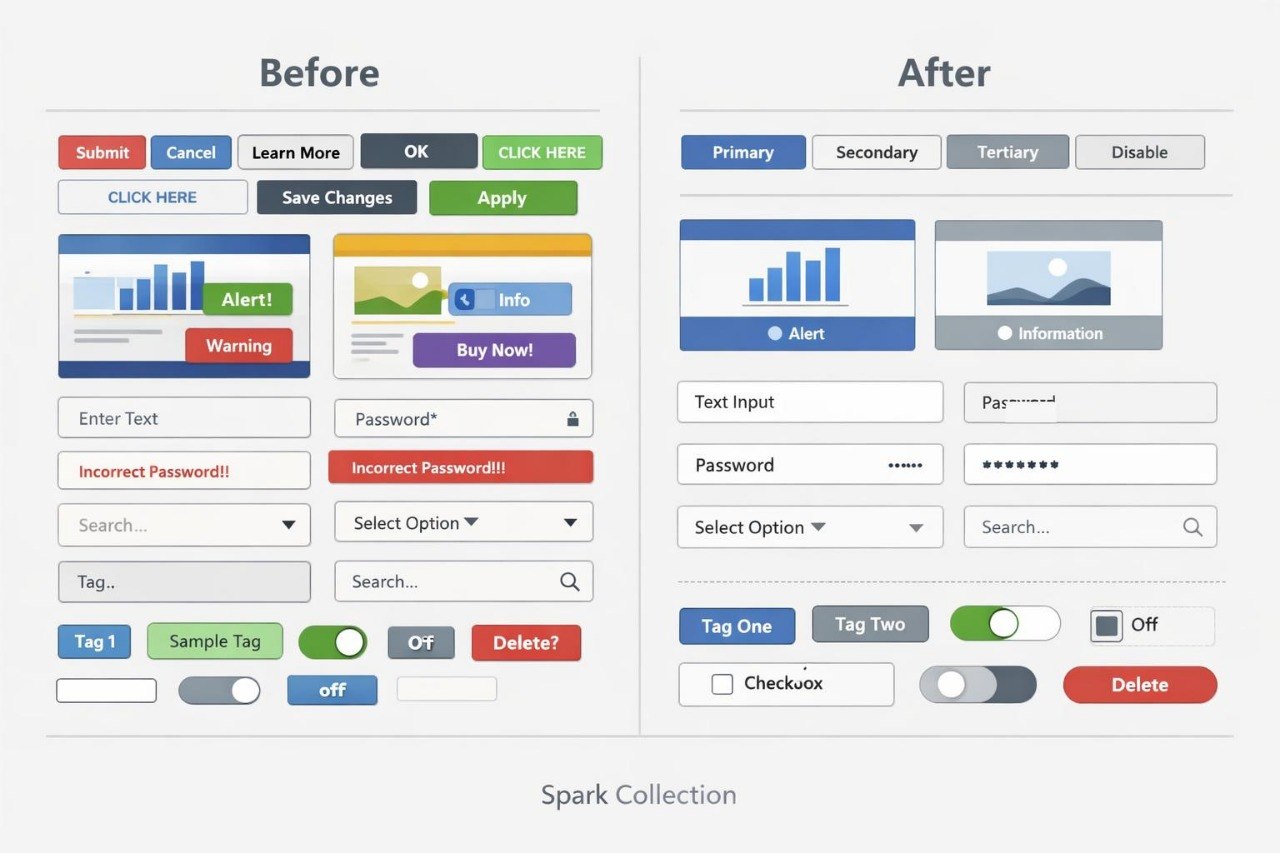
Struggling to maintain the same appearance and logic across different screens? You are not alone: as an interface grows, buttons, headings, fields, and cards often begin to differ without a clear reason. Even small variations in spacing, text size, or component states can make the structure feel disconnected. Without shared rules, each new screen may need to be styled almost from the beginning. Spark Collection explains how to gather key visual decisions into a consistent system and describe how they should be used.
2. Solution
This course will teach you how to create a basic visual system for a group of connected screens. You will examine typography hierarchy, color roles, grids, spacing, and reusable components. The materials explain how to define element variations and document their states without unnecessary duplication. Practical assignments help you review screen consistency and identify departures from selected rules. After completing the course, you will be able to prepare a small component library and a focused document explaining how it should be applied.
3. What’s Inside
Module 1: Visual System Foundations
Examine the purpose of repeated rules and identify which interface elements should remain consistent across a project.
Module 2: Typography Structure
Create defined levels for headings, body text, labels, and supporting information.
Module 3: Color Roles and Contrast
Assign clear functions to selected colors and examine the readability of central combinations.
Module 4: Spacing and Layout Rhythm
Build a spacing system and study how repeated rhythm can organize sections and components.
Module 5: Component Families
Examine buttons, fields, cards, messages, and navigation elements together with their main variations.
Module 6: Component States
Describe default, active, inactive, selected, and error states for key interface elements.
Module 7: Consistency Review
Compare a series of study screens, identify visual differences, and prepare a revision list.
Module 8: Mini Style Guide Assignment
Create a focused collection of rules, component examples, and notes describing their intended use.
4. Who Is This For?
✅ A good fit if you:
- have created page frameworks and connected screens;
- want to organize visual decisions;
- would like to treat typography, color, and spacing as one system;
- want to create reusable components;
- are prepared to examine details and document selected rules.
❌ Not for you if you:
- are not yet familiar with basic interface structure;
- only want materials about illustration;
- do not plan to complete screen-comparison exercises;
- expect a defined employment or commercial outcome.
5. What You’ll Learn
- create a typography scale with at least five levels;
- define the purpose of central interface colors;
- build a consistent spacing system;
- prepare at least six reusable components;
- describe states for buttons, fields, and navigation elements;
- identify visual differences across related screens;
- document component usage rules;
- prepare one focused interface element library;
- create a short visual guide for a study project.
6. 30-Day Refund Policy
Spark Collection includes a 30-calendar-day period for submitting a refund request under the Wirelio store rules. The review considers the purchase date, the amount of material already used, and the conditions listed on the refund policy page. Please read the complete policy before placing an order.
7. Certificate
A digital Wirelio certificate is issued after all required modules and the final assignment have been completed. It records completion of the Spark Collection course materials.
1. What format do Wirelio courses use?
1. What format do Wirelio courses use?
The courses contain sequential modules, written explanations, visual examples, practical exercises, and materials for independent study. Learners can work through the content at their own pace and revisit earlier topics when needed.
2. Do I need previous UI/UX design experience?
2. Do I need previous UI/UX design experience?
The introductory plans are suitable for people who are new to UI/UX design. Higher plans include additional assignments, scenarios, and topics, so reviewing the individual course description can help you select a suitable option.
3. How are the Wirelio plans different?
3. How are the Wirelio plans different?
The plans are arranged according to the amount and depth of the included materials. Higher options may contain additional modules, exercises, templates, interface examples, and subjects for independent study.
4. Is a certificate included?
4. Is a certificate included?
Yes. A Wirelio certificate is issued after all required modules and assignments have been completed. It confirms participation in the learning program but does not represent a government-issued diploma or formal occupational qualification.
Share