Wirelio
Edge Deck
Edge Deck
Couldn't load pickup availability
Self-paced learning overview
- 📥 Digital file available after purchase
- 📚 Long-term availability
- 🔒 Secure checkout
- 🗓️ Content updated in 2026
1. Problem Statement
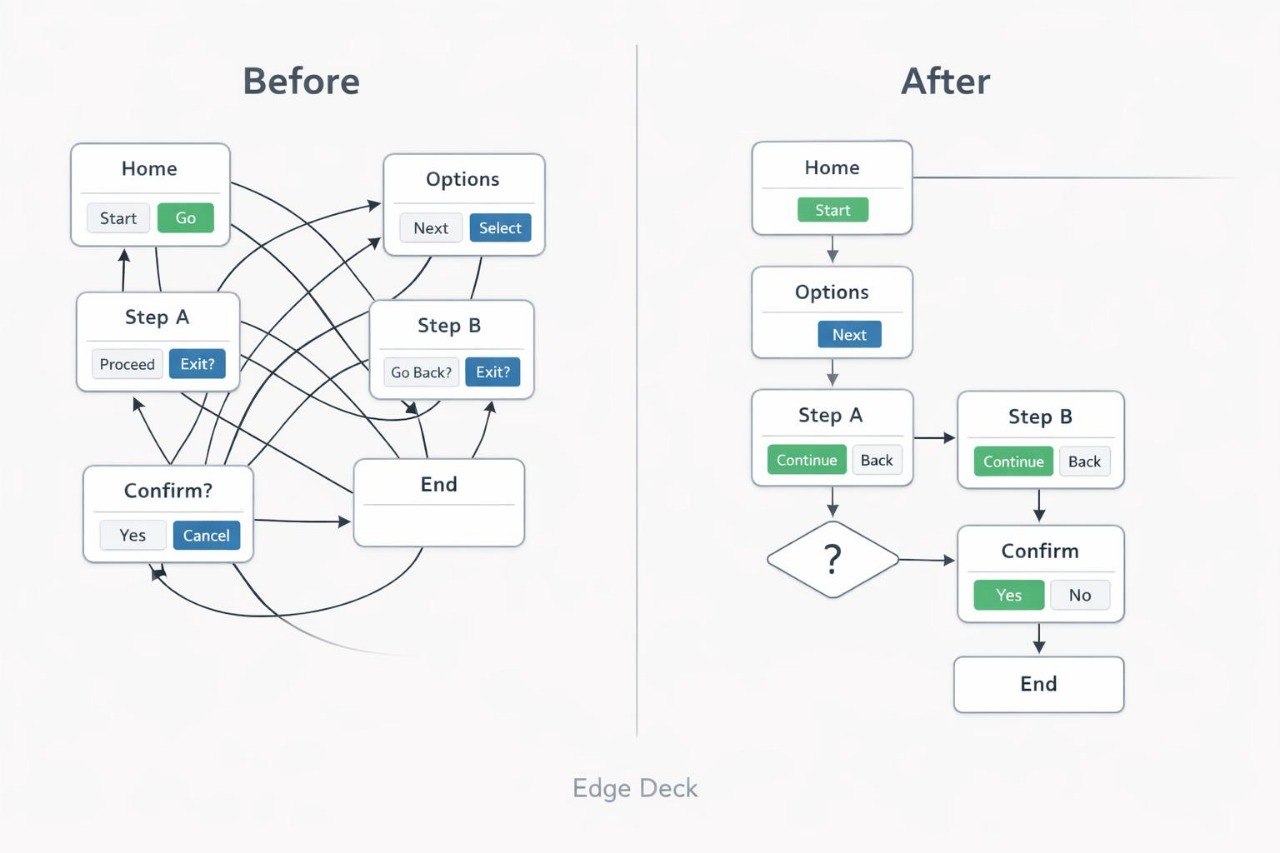
Struggling to make several screens work as one understandable system? You are not alone: after creating an individual page, many new designers are unsure how to connect it with the rest of an interface. Navigation elements may change position, button labels may become inconsistent, and the user path may contain unnecessary steps. This can leave people guessing where to go and what will happen after an action. Edge Deck helps you examine an interface as a sequence of connected decisions.
2. Solution
This course will teach you how to create simple user flows and connect screens into a structured path. You will study navigation principles, reusable components, and clear interface states. The materials explain how to check whether each step has a defined purpose and leads naturally to the next action. Practical assignments help you compare different routes and remove unnecessary transitions. After completing the course materials, you will be able to prepare a small digital flow and explain the reasoning behind its structure.
3. What’s Inside
Module 1: From Single Screens to Connected Flows
Learn how individual pages form a complete scenario and why the links between them shape the overall interface experience.
Module 2: Navigation Patterns
Examine menus, tabs, transition buttons, backward navigation, and other methods used to move between sections.
Module 3: User Flow Mapping
Create a map of user actions by defining the starting point, intermediate decisions, and final stage of a scenario.
Module 4: Reusable Interface Elements
Identify repeated elements and describe how they should behave across different screens.
Module 5: States and Feedback
Study ways to communicate waiting periods, errors, completed actions, and interface changes without overcrowding the page.
Module 6: Flow Review Exercise
Analyze a sample scenario, identify inconsistent steps, and prepare a revised transition map.
4. Who Is This For?
✅ A good fit if you:
- understand the basic structure of an individual page;
- want to connect several screens into one flow;
- would like to examine navigation logic;
- want to work with focused user scenarios;
- prefer a combination of explanations, diagrams, and practical tasks.
❌ Not for you if you:
- only want materials about decorative styling;
- need an advanced program covering large multi-layer systems;
- require individual guidance for every assignment;
- expect a defined career or commercial outcome.
5. What You’ll Learn
- create a user path containing three or more screens;
- define the primary action at each stage;
- reduce unnecessary transitions;
- keep button and section labels consistent;
- describe at least four interface states;
- identify reusable components;
- review the logic of returning to a previous step;
- prepare one complete user-flow diagram;
- explain why a selected route is understandable to its intended users.
6. 30-Day Refund Policy
Edge Deck includes a 30-day period for submitting a refund request under the Wirelio store policy. The review considers the purchase date, the amount of material already used, and the conditions stated in the refund rules. Please read the complete policy before placing an order.
7. Certificate
A digital Wirelio certificate is issued after all required modules and the final assignment have been completed. It records completion of the Edge Deck course materials.
1. What format do Wirelio courses use?
1. What format do Wirelio courses use?
The courses contain sequential modules, written explanations, visual examples, practical exercises, and materials for independent study. Learners can work through the content at their own pace and revisit earlier topics when needed.
2. Do I need previous UI/UX design experience?
2. Do I need previous UI/UX design experience?
The introductory plans are suitable for people who are new to UI/UX design. Higher plans include additional assignments, scenarios, and topics, so reviewing the individual course description can help you select a suitable option.
3. How are the Wirelio plans different?
3. How are the Wirelio plans different?
The plans are arranged according to the amount and depth of the included materials. Higher options may contain additional modules, exercises, templates, interface examples, and subjects for independent study.
4. Is a certificate included?
4. Is a certificate included?
Yes. A Wirelio certificate is issued after all required modules and assignments have been completed. It confirms participation in the learning program but does not represent a government-issued diploma or formal occupational qualification.
Share